Skillix operational software

Incident management for field operations

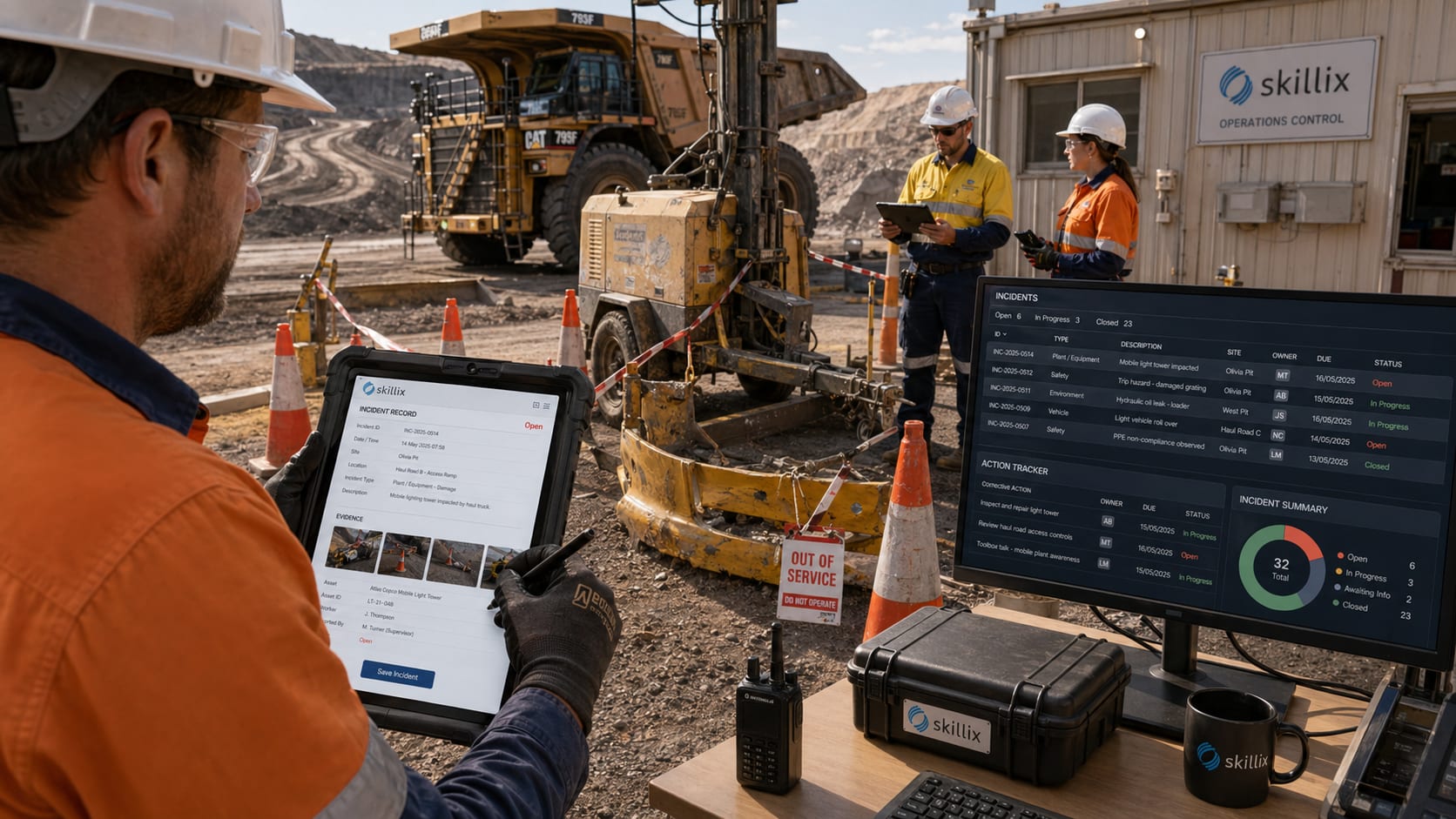
Capture operational incidents, safety events, asset exceptions, no-shows, field evidence, follow-up actions, communications, documents, and proof of response inside the same operating platform.

How Skillix helps

The work Skillix brings into one accountable operating record

Feature / Incident management01

A field incident needs evidence, corrective actions, communication, and closure proof.

Skillix can connect the site, asset, worker, supervisor, field evidence, documents, communications, workflow actions, and closure decision so the response record is complete.

Control intentincident management software
Linked modules7
Proof postureTraceable
Current Friction02
  • Incidents lose operational power when they are captured away from the worker, asset, site, job, supervisor, and evidence context.
  • Follow-up actions can drift when communications, documents, photos, workflow owners, and deadlines are not connected.
  • Safety, operations, maintenance, payroll, and customer teams need the same response record, not separate versions of events.
Skillix operating record03
  • Capture incidents against the person, asset, site, job, roster, supervisor, documents, and field evidence involved.
  • Route investigation steps, corrective actions, communications, evidence requests, and escalations through workflows.
  • Keep proof of response connected to the operational history so teams can see what happened and what changed.
Connected modules04
Incident ManagementCompanion AppAssetsWorkforceDocumentsCommunicationsWorkflows
Field capture05
  • Record no-shows, safety events, plant exceptions, damage, hazards, and operational disruptions close to the work.
  • Attach field notes, photos, documents, supervisor context, worker context, and asset context to the incident.
  • Keep offline-capable capture aligned with the main operating record when connectivity returns.
Corrective action control06
  • Assign follow-up owners, due dates, reminders, document requests, communications, and escalation paths.
  • Connect incident action to asset maintenance, workforce readiness, compliance review, payroll impact, or customer reporting.
  • Show what remains open before unresolved risk becomes repeated operational failure.
Proof of response07
  • Preserve the audit history around the event, evidence, decisions, communications, and closure.
  • Give safety, operations, supervisors, and customers the same response picture.
  • Let AI Watchman highlight repeated patterns, missing proof, and high-risk follow-up signals for review.
Problems Skillix controls

Turn the pressure points into accountable operating work.

Skillix is designed around the real points where work stalls: missing proof, unclear ownership, disconnected systems, manual follow-up, and decisions made too late.

01

Incidents lose operational power when they are captured away from the worker, asset, site, job, supervisor, and evidence context.

02

Follow-up actions can drift when communications, documents, photos, workflow owners, and deadlines are not connected.

03

Safety, operations, maintenance, payroll, and customer teams need the same response record, not separate versions of events.

What Skillix produces

A field incident needs evidence, corrective actions, communication, and closure proof.

Skillix can connect the site, asset, worker, supervisor, field evidence, documents, communications, workflow actions, and closure decision so the response record is complete.

Request a Skillix walkthrough
  1. Capture incidents against the person, asset, site, job, roster, supervisor, documents, and field evidence involved.
  2. Route investigation steps, corrective actions, communications, evidence requests, and escalations through workflows.
  3. Keep proof of response connected to the operational history so teams can see what happened and what changed.
Real operating use cases

Where Skillix turns this pressure point into operational control.

These are the problems Skillix is built to control when teams are still relying on spreadsheets, disconnected point tools, and manual follow-up.

Operating use case

Field incident capture with the operating context intact

Skillix can connect a field event to the worker, asset, site, job, roster, supervisor, evidence, and documents involved in the response.

  • Capture no-shows, safety events, plant exceptions, hazards, damage, and operational disruptions close to the work.
  • Attach photos, notes, evidence, asset context, and supervisor context to the incident record.
  • Keep offline field capture aligned with the operating record when connectivity returns.
Operating use case

Corrective actions that remain owned until closure

Incident management is only useful when investigation steps, corrective actions, communications, and closure proof remain visible.

  • Assign owners, due dates, reminders, evidence requests, and escalation paths.
  • Connect follow-up to asset maintenance, workforce readiness, compliance review, payroll impact, or customer reporting.
  • Preserve the audit trail from event to decision to closure.
Connected control path

This capability becomes stronger when it connects to the surrounding operation.

The strongest outcome is not the page by itself. It is the way Incident Management, Companion App, Assets and the wider Skillix record reinforce the same decision.

Connect

Tie the capability to live operating records.

Skillix connects the page’s focus area to the workers, jobs, sites, assets, documents, communications, and workflows around it.

Validate

Turn scattered data into a release decision.

Readiness, compliance, evidence, movement, and follow-up can be checked before the decision reaches site pressure.

Escalate

Make gaps visible until they are closed.

Alerts, communications, AI-assisted checks, and workflow ownership keep blockers from disappearing into inboxes or spreadsheets.

Frequently asked questions

Answers for teams comparing Skillix.

What should incident management software capture for field operations?

Incident management software should capture the site, job, worker, asset, supervisor, evidence, photos, documents, communications, corrective actions, owners, deadlines, and closure proof around the event.

Can Skillix connect incidents to asset and workforce records?

Yes. Skillix is designed to connect incidents to employees, assets, jobs, sites, rosters, field evidence, documents, communications, maintenance follow-up, and workforce readiness impact.

How does Skillix support corrective action follow-up?

Skillix routes corrective actions through workflow owners, due dates, reminders, document requests, communications, escalation paths, and audit history so unresolved actions remain visible.


Related Skillix areas

Keep building the connected operation.

Follow the Skillix areas that support this workflow: Incident Management, Companion App, Assets, Workforce, and the surrounding operating record.

Walkthrough path

See how this workflow connects to the rest of your operation.

Bring the workflow you want to improve. We will map the surrounding people, proof, movement, field capture, and follow-up actions that Skillix can control.

Request a Skillix walkthrough
Walkthrough request

Request a Skillix walkthrough for this workflow.

Tell us where this pressure point shows up in your business and we will show how Skillix connects Incident Management, Companion App, Assets, Workforce, and the surrounding operating record.

What happens next
  1. Review your operation, pressure points, and current systems.
  2. Show where Skillix can connect readiness, proof, movement, and follow-up.
  3. Prioritise the highest-value starting point for your business.