

Skillix operational software

Workforce planning and scheduling for industrial crews

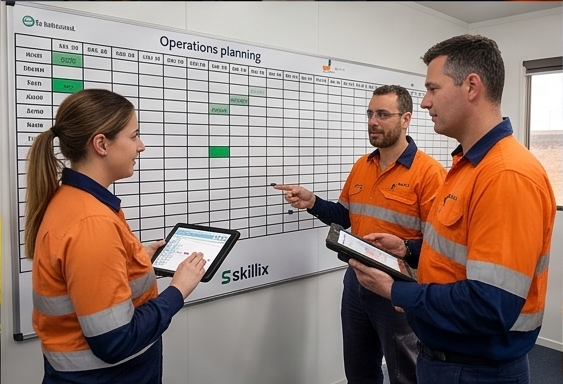
Plan crews against job demand, role requirements, roster patterns, day and night shifts, availability, leave, transport needs, site context, fit-for-purpose site requirements, fit-for-duty medical status, and audit history in one visual planning surface.

How Skillix helps

The work Skillix brings into one accountable operating record

Feature / Workforce planning01

A shutdown coordinator needs to staff multiple role rows across day and night shifts.

Skillix can bring job demand, role requirements, roster patterns, leave, employee availability, transport flags, AI agent analysis, and planner history into the same board so coordinators can build a schedule that operations can actually use.

Control intentworkforce planning and scheduling software
Linked modules6
Proof postureTraceable
Current Friction02
  • Crew planning often happens away from the job demand, site rules, roster pattern, leave context, and compliance evidence that determine whether the plan will hold.
  • Schedulers need to see coverage gaps, unplanned roles, day and night shifts, swing patterns, and busy workers before allocations become mobilisation problems.
  • Dragging names into a roster is not enough when every change needs operational context, transport impact, site-requirement validation, medical-status validation, and a defensible history.
Skillix operating record03
  • Plan allocations from real jobs, published role requirements, project dates, roster patterns, and available employee records.
  • Use a visual day, week, or month planning board with drag-and-drop allocation, role rows, coverage indicators, leave visibility, and filtered resource search.
  • Validate employees against site requirements for fit for purpose and medical status for fit for duty before the roster becomes a mobilisation promise.
  • Keep site compliance in the planning decision so employees and assets are checked before the schedule reaches the field.
  • Use dedicated AI agents to analyse scheduling criteria, surface smart staff matches, and challenge whether the plan fits the operating constraints.
  • Keep allocation changes, future swing updates, bulk transport decisions, deletes, and planner history tied to the employee, job, and audit record.
  • Give operations a plan that explains who is assigned, why they fit, what is still open, and what needs action next.
Connected modules04
WorkforceRosteringJobs & SitesSite ComplianceAccommodation & FlightsWorkflows
Planner control points05
  • Drag people from the resource drawer directly onto job and role rows.
  • Use day, week, and month horizons to move from daily mobilisation to longer swing planning.
  • Filter resources by availability, role, search term, and skills or certification tags before allocating.
AI agent validation06
  • Run dedicated AI analysis over the visible workforce planning context instead of relying on manual spreadsheet checks.
  • Ask for smart matches against role, certification, availability, location, site requirements, and medical status.
  • Use AI-assisted signals to challenge the plan before it becomes a site, travel, or compliance failure.
Roster pattern intelligence07
  • Apply recurring patterns such as on/off swings where role requirements define the planning rhythm.
  • Carry future allocations forward when a swing changes instead of manually rebuilding each roster cycle.
  • Expose unplanned roles and open coverage so coordinators can close gaps before crews reach site.
Planning outputs08
  • Show the difference between a filled roster and a crew that is actually ready to work.
  • Keep transport flags, compliance blockers, leave, availability, and future roster changes visible while planning.
  • Give supervisors and coordinators a defensible schedule they can explain before work starts.
Problems Skillix controls

Turn the pressure points into accountable operating work.

Skillix is designed around the real points where work stalls: missing proof, unclear ownership, disconnected systems, manual follow-up, and decisions made too late.

01

Crew planning often happens away from the job demand, site rules, roster pattern, leave context, and compliance evidence that determine whether the plan will hold.

02

Schedulers need to see coverage gaps, unplanned roles, day and night shifts, swing patterns, and busy workers before allocations become mobilisation problems.

03

Dragging names into a roster is not enough when every change needs operational context, transport impact, site-requirement validation, medical-status validation, and a defensible history.

What Skillix produces

A shutdown coordinator needs to staff multiple role rows across day and night shifts.

Skillix can bring job demand, role requirements, roster patterns, leave, employee availability, transport flags, AI agent analysis, and planner history into the same board so coordinators can build a schedule that operations can actually use.

Request a Skillix walkthrough
  1. Plan allocations from real jobs, published role requirements, project dates, roster patterns, and available employee records.
  2. Use a visual day, week, or month planning board with drag-and-drop allocation, role rows, coverage indicators, leave visibility, and filtered resource search.
  3. Validate employees against site requirements for fit for purpose and medical status for fit for duty before the roster becomes a mobilisation promise.
  4. Keep site compliance in the planning decision so employees and assets are checked before the schedule reaches the field.
  5. Use dedicated AI agents to analyse scheduling criteria, surface smart staff matches, and challenge whether the plan fits the operating constraints.
  6. Keep allocation changes, future swing updates, bulk transport decisions, deletes, and planner history tied to the employee, job, and audit record.
  7. Give operations a plan that explains who is assigned, why they fit, what is still open, and what needs action next.
Real operating use cases

Where Skillix turns this pressure point into operational control.

These are the problems Skillix is built to control when teams are still relying on spreadsheets, disconnected point tools, and manual follow-up.

Operating use case

Skillix vs basic roster tools

Basic roster tools place people into shifts. Skillix plans people against job demand, role rows, site requirements, medical status, availability, transport impact, and audit history.

  • Plan day, week, and month horizons from real jobs and role demand.
  • Validate fit-for-purpose site requirements and fit-for-duty medical status before release.
  • Use AI-assisted planning signals to challenge whether the schedule fits operational constraints.
Operating use case

Shutdown and swing scheduling

For shutdowns and recurring swings, Skillix keeps roster patterns, unplanned roles, leave, availability, transport flags, and future allocation changes visible in the same planning board.

  • Expose coverage gaps before allocations become mobilisation problems.
  • Carry future allocations forward when a swing changes.
  • Preserve allocation changes, deletes, bulk decisions, and planner history.
Connected control path

This capability becomes stronger when it connects to the surrounding operation.

The strongest outcome is not the page by itself. It is the way Workforce, Rostering, Jobs & Sites and the wider Skillix record reinforce the same decision.

Connect

Tie the capability to live operating records.

Skillix connects the page’s focus area to the workers, jobs, sites, assets, documents, communications, and workflows around it.

Validate

Turn scattered data into a release decision.

Readiness, compliance, evidence, movement, and follow-up can be checked before the decision reaches site pressure.

Escalate

Make gaps visible until they are closed.

Alerts, communications, AI-assisted checks, and workflow ownership keep blockers from disappearing into inboxes or spreadsheets.

Frequently asked questions

Answers for teams comparing Skillix.

How is workforce planning different from basic rostering?

Basic rostering places people into shifts. Skillix workforce planning connects shifts to job demand, role requirements, site rules, leave, availability, compliance, medical status, transport needs, AI-assisted checks, and audit history.

Can Skillix validate people before they are scheduled?

Yes. Skillix is designed to validate employees against site requirements for fit for purpose and medical status for fit for duty before the roster becomes a mobilisation promise.

Does Skillix support AI-assisted workforce scheduling?

Skillix can use dedicated AI agents to analyse planning criteria, surface smart staff matches, and challenge whether the schedule fits the operating constraints around role, availability, site requirements, medical status, and location.

Related Skillix areas

Keep building the connected operation.

Follow the Skillix areas that support this workflow: Workforce, Rostering, Jobs & Sites, Site Compliance, and the surrounding operating record.

Walkthrough path

See how this workflow connects to the rest of your operation.

Bring the workflow you want to improve. We will map the surrounding people, proof, movement, field capture, and follow-up actions that Skillix can control.

Request a Skillix walkthrough
Walkthrough request

Request a Skillix walkthrough for this workflow.

Tell us where this pressure point shows up in your business and we will show how Skillix connects Workforce, Rostering, Jobs & Sites, Site Compliance, and the surrounding operating record.

What happens next
  1. Review your operation, pressure points, and current systems.
  2. Show where Skillix can connect readiness, proof, movement, and follow-up.
  3. Prioritise the highest-value starting point for your business.