How Skillix works

Connect the work, validate readiness, and keep proof attached to every decision.

Skillix gives industrial teams one operating loop for the decisions that release work: capture the record, validate readiness, plan movement, capture field proof, and trigger follow-up before gaps become expensive.

Skillix pathwayMove from operating loop to modules, proof, and pricing
Operating loop

Skillix works by keeping the decision and the surrounding proof together.

Most operational systems fragment after the first handoff. Skillix is designed so the worker, asset, site, job, roster, document, field event, communication, workflow action, and audit history reinforce the same decision.

01 / Record

Capture the operating record

Skillix starts by bringing the people, roles, sites, jobs, assets, documents, movements, messages, and evidence into one governed operating record.

  • Employee and contractor context stays connected to work demand.
  • Customer, site, asset, and job records stop drifting away from the decision.
  • Documents, communication history, and audit proof remain attached to the work.
02 / Validate

Validate readiness before commitment

Skillix checks whether the person or asset is fit for the role, site, job, roster, medical status, evidence requirement, and field context before mobilisation pressure lands.

  • Fit-for-purpose site and role checks sit beside fit-for-duty medical status.
  • Competencies, inductions, restrictions, evidence, and asset readiness are visible together.
  • AI-assisted checks can flag gaps while humans keep release control.
03 / Plan

Plan the workforce and movement

Workforce planning links job demand, roster patterns, role rows, availability, leave, travel, accommodation, site access, and transport impact.

  • Coordinators can see role coverage and roster pressure before crews are released.
  • FIFO movement, rooms, transport, no-shows, and changed swings stay tied to the crew.
  • Scheduling decisions keep compliance and payroll context close.
04 / Field

Capture field proof, even offline

The companion mobile app gives supervisors field capture for toolbox talks, prestarts, no-shows, evidence, timesheets, roster notifications, and follow-up on remote sites.

  • Offline mode keeps remote supervision moving when internet is unavailable.
  • Field events stay attached to workers, assets, jobs, sites, and shifts.
  • Evidence and exceptions reach the operating record instead of disappearing into messages.
05 / Act

Trigger workflows and keep proof

Skillix turns readiness gaps, missing evidence, communication events, payroll context, CRM handover, and risk signals into owned workflow actions.

  • Every blocker has a route, owner, and audit trail.
  • Communications and reminders are connected to the record that triggered them.
  • The business can prove what happened, who acted, and what changed.

Product proof

See the operating loop across people, plans, and site requirements.

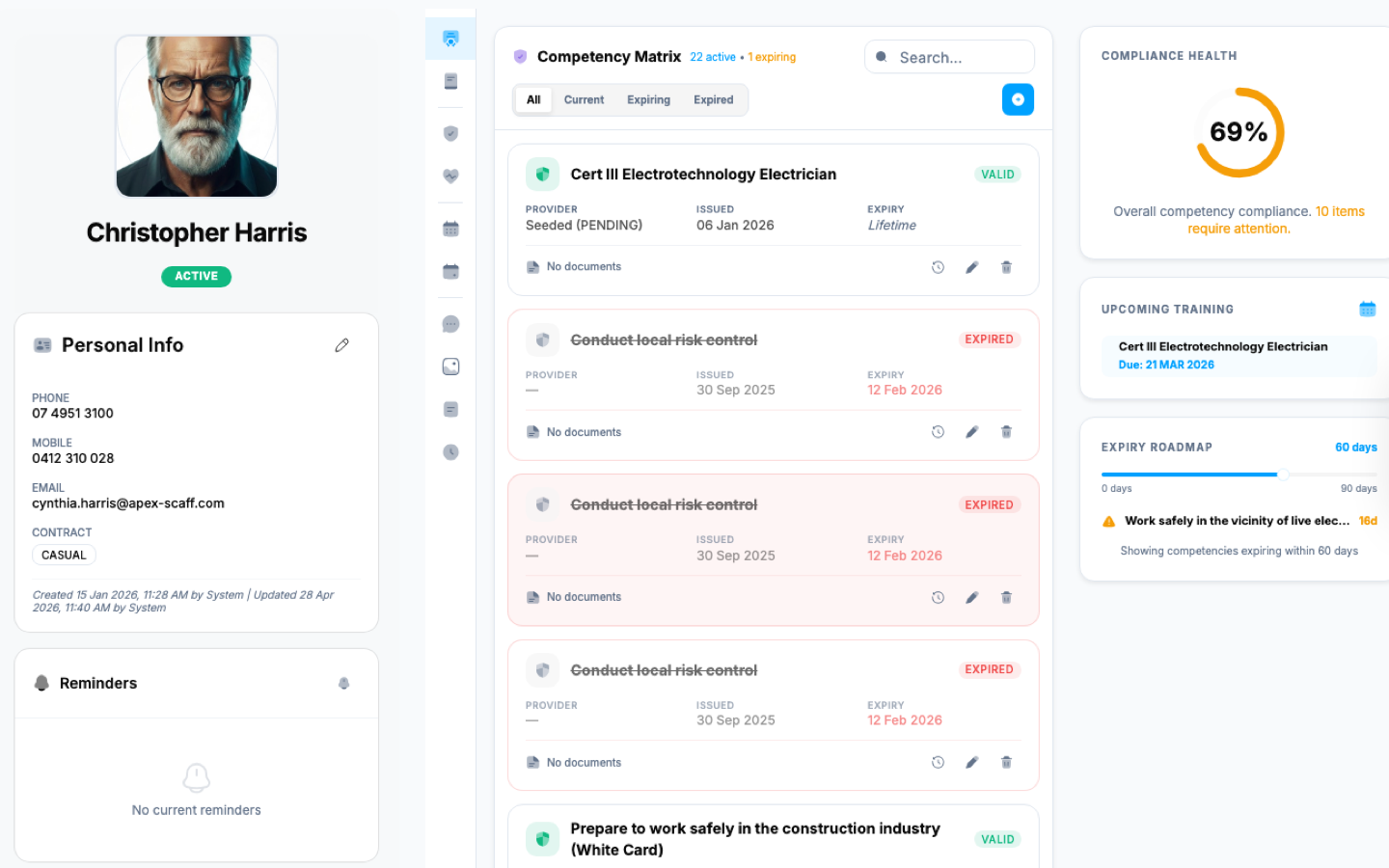
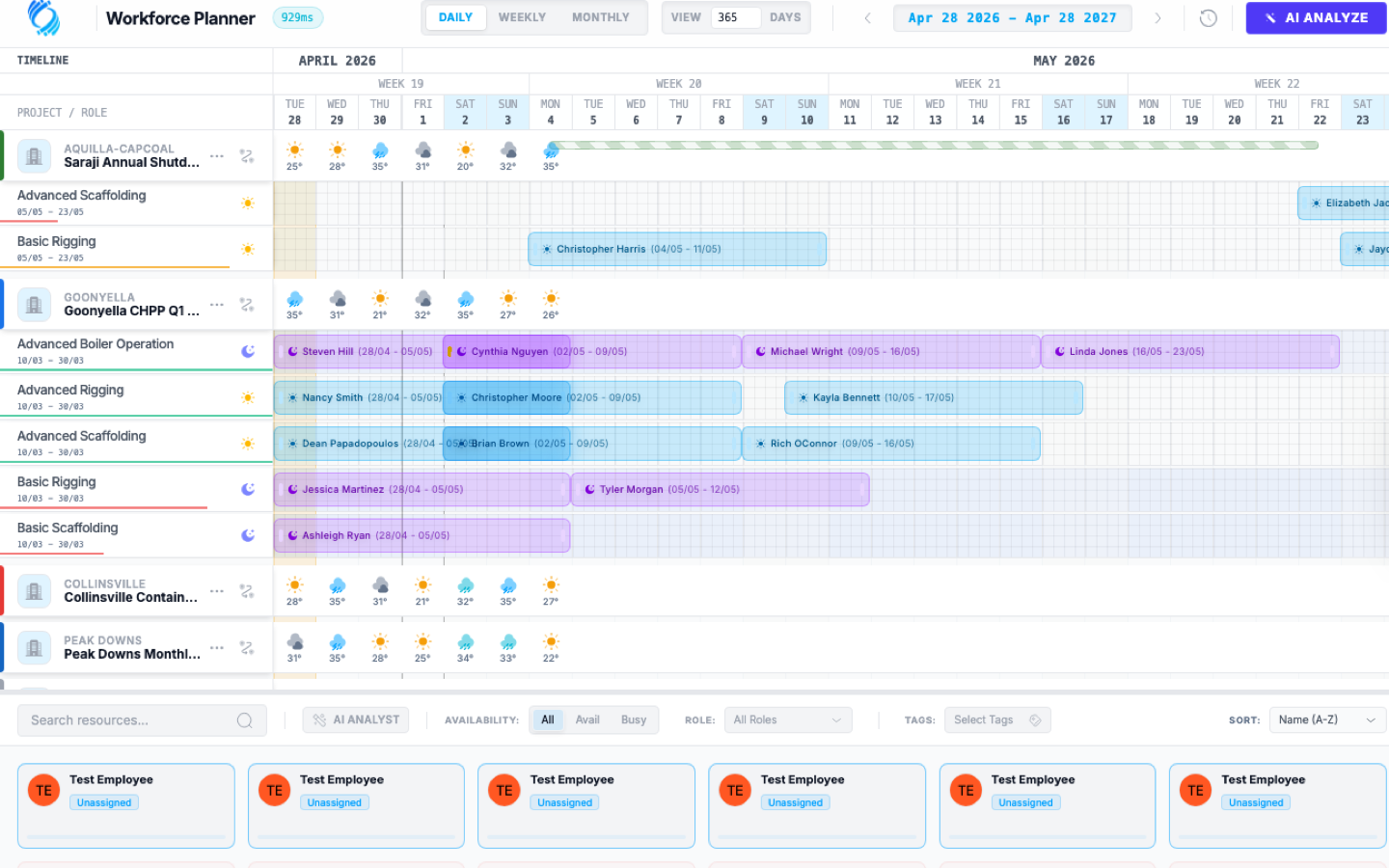
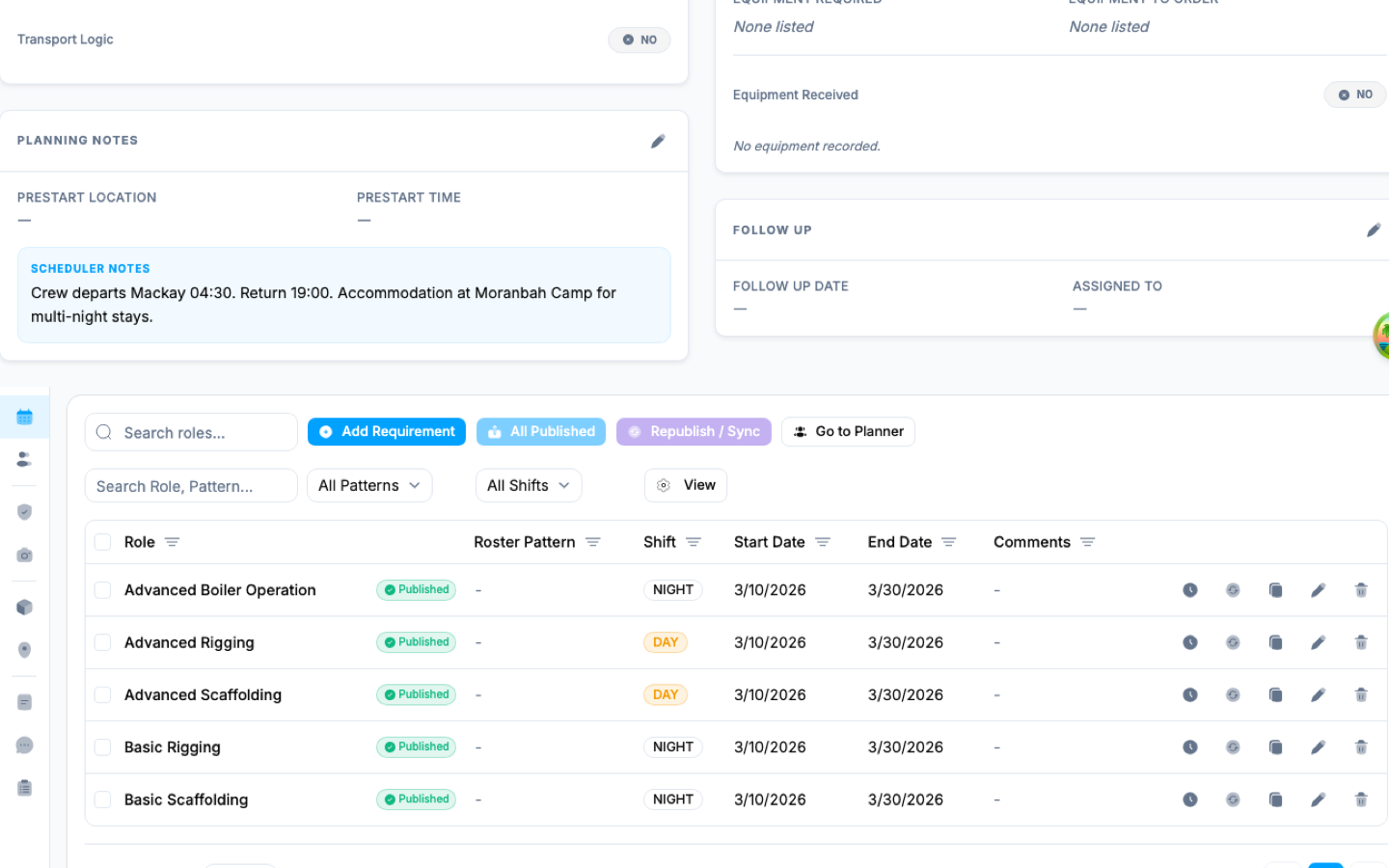
These Apex Scaffolding demo views show how Skillix keeps employee readiness, workforce scheduling, job status, role requirements, and compliance evidence visible before work is released.

Employee readiness record screenshot
Apex Scaffolding demo

Employee readiness record

Real Skillix UI showing an Apex Scaff employee profile with contact context, emergency details, identifiers, external access, role assignments, and competency evidence in one operating record.

22active competencies visible on the selected Apex Scaff employee record
Workforce planning timeline screenshot
Planner demo

Workforce planning timeline

Skillix shows job demand, roster rows, role requirements, weather context, assigned workers, availability pressure, and open resources in the same scheduling view.

365planning days visible across daily, weekly, and monthly roster horizons
Job and site requirement control screenshot
Goonyella shutdown demo

Job and site requirement control

Skillix connects shutdown job status, site context, scheduler notes, published role requirements, shift coverage, and planner handoff around the work package.

5published role requirements tied to the selected Goonyella CHPP job
What the walkthrough proves

Leave with an operating picture, not a generic product tour.

A Skillix walkthrough maps your pressure point to the records, checks, field events, workflow actions, and proof trail that would make the operation easier to control.

Request a Skillix walkthrough
  1. A controlled record of who was planned, checked, released, blocked, or changed.
  2. Evidence and field events attached to the worker, asset, site, job, shift, and decision.
  3. Workflow actions and communications that show who owned the next step.
  4. A practical rollout path that starts with the highest-value control point.
Walkthrough request

See how the Skillix operating loop would apply to your business.

Tell us where your operating record breaks today. We will show how Skillix can connect the records, checks, field events, workflows, and proof around that decision.

What happens next
  1. Review your operation, pressure points, and current systems.
  2. Show where Skillix can connect readiness, proof, movement, and follow-up.
  3. Prioritise the highest-value starting point for your business.